ZTE Blade Unlock Code by IMEI
£1.99
Unlock code for 31 ZTE phone models. Choose your model, enter the 15-digit IMEI (dial *#06#), and we email you the code, usually within a few minutes. £1.99 per code, for every model on this page.
- 1Choose your model
- 2Enter your IMEI
- 3We email your code
- Unlock code sent by email: no postage
- Dial *#06# to find your IMEI
- Do not guess codes: tries are limited
- Questions? WhatsApp 07440 482830
Description
Our ZTE unlock code removes the network lock from ZTE phones, so they work with any SIM. It covers 31 models, mostly from the ZTE Blade range, like the Blade A5, Blade Q and Blade X7, plus a few others.
Price: £1.99 per code, for every model on this page. The code is sent by email, usually within a few minutes, so there is nothing to post.
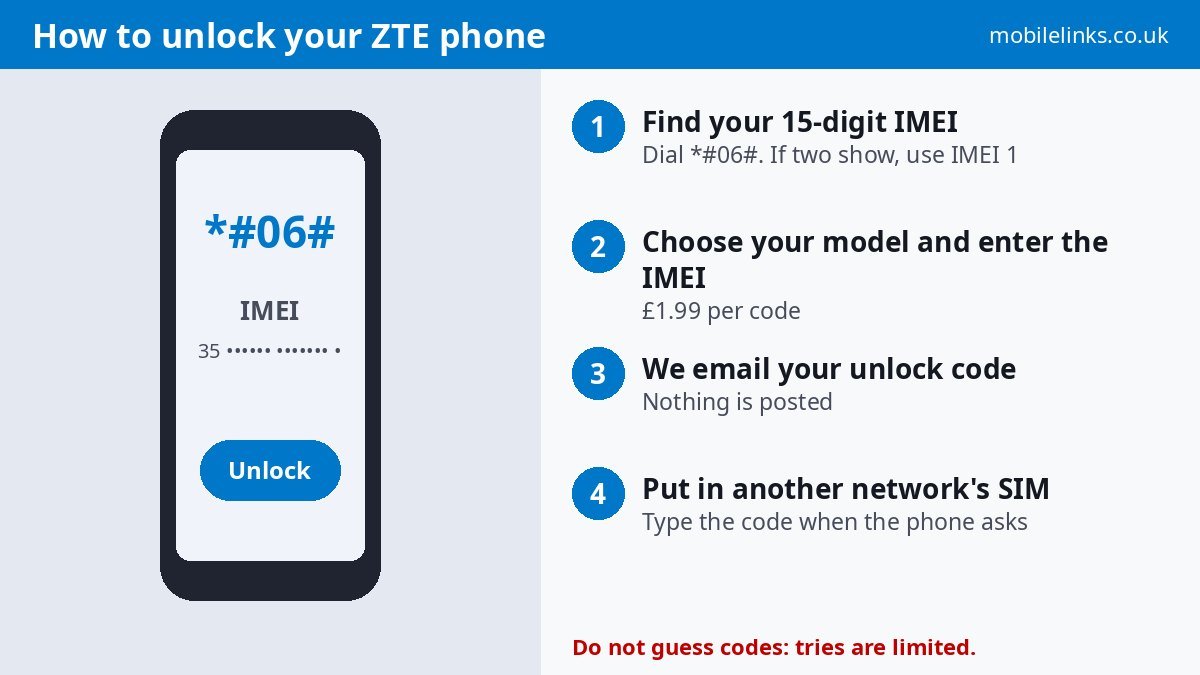
How to unlock your ZTE phone with a code
- Dial *#06# to get the 15-digit IMEI. If two numbers appear, use IMEI 1.
- Choose your model from the list above, type the IMEI and place your order.
- We email you the unlock code for that IMEI, usually within a few minutes.
- Put in a SIM from a different network and restart the phone. When it asks for the network unlock PIN, type the code we sent you.
Where to find your model number
Go to Settings, then About phone, to see the model. The IMEI is also on the box.
Before you order
- The code only works for the IMEI you give us. Copy it carefully, because a wrong IMEI means a wrong code.
- Most devices allow only a few wrong tries. Do not guess or type random codes. Use the IMEI shown when you dial *#06#. A box can belong to a different phone.
- Your phone must be locked to a network, not blocked or reported lost.
- One order is one code for one IMEI.
Questions about this unlock code
What is an unlock code?
Your phone is locked to the network it was sold on. The unlock code is a number made from its IMEI. Once you type it in, the phone works with any network.
How do I find the IMEI on my phone?
Dial *#06#. The 15-digit number on screen is the IMEI.
Is ZTE Blade unlocking permanent?
Yes. Once the right code is accepted, the network lock is gone, even after updates or a factory reset.
My ZTE was sold by a UK network. Is that fine?
Yes. Network-locked ZTE phones from UK networks are the usual reason people need this code. Just check your model is in the list.
Does this remove a Google account lock (FRP) or iCloud?
No. An unlock code only removes the network lock. For a Google account lock after a reset, see FRP unlocking.
Can a code unlock a lost or stolen device?
No. A blocked IMEI stays blocked. We only provide codes for devices you own or are allowed to unlock.
ZTE models on this page
See all 31 ZTE models we unlock
Blade A3, Blade A465, Blade A5, Blade A5 Pro, Blade C2, Blade C341, Blade D6 Lite 3G, Blade GLux, Blade GPRO, Blade L105, Blade L110, Blade L111, Blade L2, Blade Q, Blade Q MAXI, Blade Q MINI, Blade V580, Blade X, Blade X7, Blade XM, Conexis A1, Kis 2 Max, Kis Q, T12, T760, T815, V795, V809, V815w, VFD-200, F320
Need a different device? See all unlock codes, or read how to unlock your phone for any UK network.