Huawei Modem & Dongle Unlock Code by IMEI
£1.99
Unlock code for 206 Huawei modem models. Choose your model, enter the 15-digit IMEI (dial *#06#), and we email you the code, usually within a few minutes. £1.99 per code, for every model on this page.
- 1Choose your model
- 2Enter your IMEI
- 3We email your code
- Unlock code sent by email: no postage
- Dial *#06# to find your IMEI
- Do not guess codes: tries are limited
- Questions? WhatsApp 07440 482830
Description
Stuck with a Huawei dongle or mobile Wi-Fi that only works on one network? Our Huawei modem unlock code frees it for any SIM. It covers 206 models, including E-series USB dongles, the B-series home routers and the WebCube.
Price: £1.99 per code, for every model on this page. The code is sent by email, usually within a few minutes, so there is nothing to post.
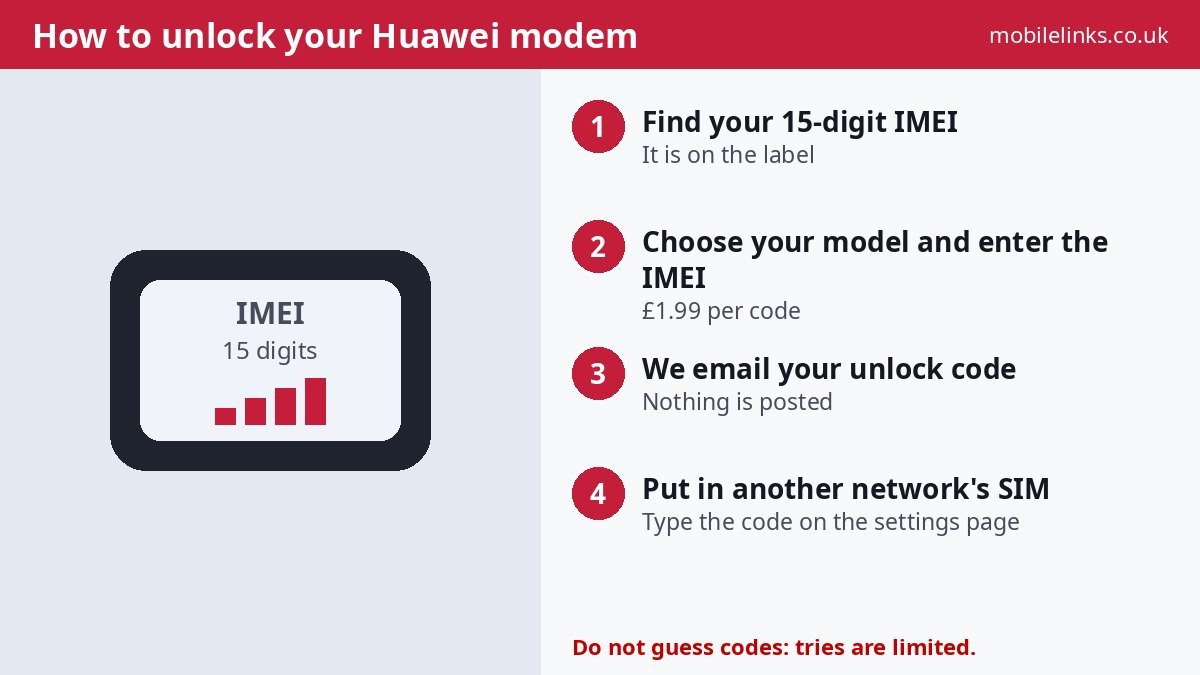
How to unlock your Huawei modem with a code
- Find the 15-digit IMEI on the label.
- Choose your model from the list above, type the IMEI and place your order.
- We email you the unlock code for that IMEI, usually within a few minutes.
- Put in a SIM from another network and plug the dongle in, or switch the router on and join its Wi-Fi. Open the device’s web page or Huawei connection software. When it asks for the unlock code, type the code we sent you.
Where to find your model number
The IMEI and model (for example E173 or B593u-12) are on the label. This is under the cover on dongles, on the bottom of routers, or under the battery of a pocket Wi-Fi.
Before you order
- The code only works for the IMEI you give us. Copy it carefully, because a wrong IMEI means a wrong code.
- Most devices allow only a few wrong tries. Do not guess or type random codes. Huawei modems lock for good after too many wrong codes. Use only the code we send, and enter it once.
- Your modem must be locked to a network, not blocked or reported lost.
- One order is one code for one IMEI.
Questions about this unlock code
What is an unlock code?
Your modem is locked to the network it was sold on. The unlock code is a number made from its IMEI. Once you type it in, the modem works with any network.
How do I find the IMEI on my modem?
It is the 15-digit number on the label. If the modem has a settings page, it is usually shown there too.
Does the code work on any firmware?
The code is made from the IMEI, not the firmware. Some firmware versions do not show an unlock box. If yours does not ask for a code, message us before ordering.
Can I unlock a Huawei router used for home broadband?
Yes, if the model is in our list. Home routers like the B593 and B970 are covered.
Does this remove a Google account lock (FRP) or iCloud?
No. An unlock code only removes the network lock. For a Google account lock after a reset, see FRP unlocking.
Can a code unlock a lost or stolen device?
No. A blocked IMEI stays blocked. We only provide codes for devices you own or are allowed to unlock.
Huawei models on this page
See all 206 Huawei models we unlock
B153 WebCube, B183, B260, B260a, B593u-12, B960, B970, E122, E153, E155, E1550, E1551, E1552, E1553, E155X, E156, E156B, E156C, E156G, E156X, E158, E159, E159G, E160, E1609, E160E, E160G, E160X, E161, E1612, E1615, E1616, E161E, E162G, E1630, E1632, E166, E166G, E169, E1690, E1692, E169G, E170, E170G, E171, E172, E172G, E173, E1731, E1732, E173u-1, E1750, E1750C, E1752, E1756, E176, E1762, E176G, E177, E180, E1800, E1803, E180G, E180S, E181, E1815, E182, E1820, E1823, E182E, E1831, E188, E196, E2010, E216, E219, E220, E226, E22X, E230, E270, E271, E272, E303, E3131, E3231, E3256, E3272, E3276, E3276-920, E3351s-2, E352, E353, E3531, E353Ws, E353Ws-2, E355, E357, E362, E367, E368, E369, E372, E392, E397, E398, E4011, E510, E5330, E5330As-2, E5330Bs-2, E5330Bs-6, E5331, E5331s, E5331s-2, E5331Ws-1, E5332, E5332s-2, E5336, E5336Bs-2, E5336Bs-6, E5336s-2, E5372s-22, E5372s-32, E5372T, E5372Ts-601, E5373, E560, E5776, E5776s, E583, E5830, E5832, E5838, E583c, E585u-82, E585v2, E586, E586e, E589, E589U, E58XX, E612, E618, E620, E630, E630+, E660, E660A, E800, E8231, E870, E880, E960, E968, E970, EC5377u-872, EG162, EG162G, EG602, EG602G, EM770, F615, F615-U20, GE161, HiLink, Huawei 823F, K2540, K3515, K3517, K3520, K3562, K3565, K3710, K4510, K4511, K4605, K5005, Megafon M100, Megafon M150-1, Megafon M21-4, Megafon MR100-3 Russia, MTC 423S, MTC 822F, MTC 822FT, MTC 823F, MTC 824FT, R201, R205, R206, R207, R208, Russia MegaFon E3272s, S4011, UMG 587, UMG1691, UMG181, UMG1831, Vodafone K2540, Vodafone K3515, Vodafone K3520, Vodafone K3565, Vodafone K4510, Vodafone K4511, Vodafone K4605, Vodafone K5005
Need a different device? See all unlock codes, or read how to unlock your phone for any UK network.